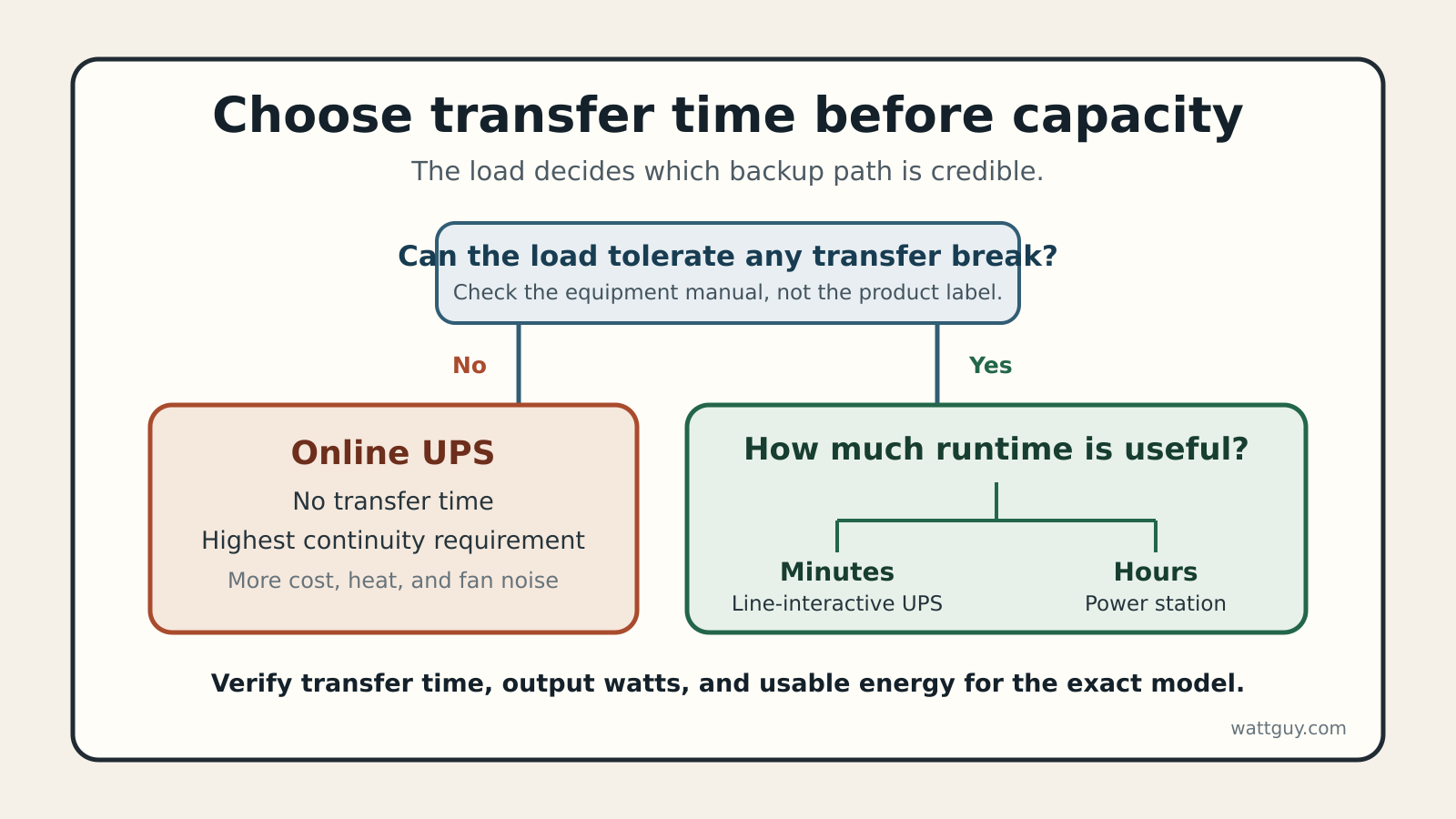
A power station vs UPS choice starts with transfer time, not battery size. Pick a dedicated UPS when a desktop, server, NAS, or network device must ride through a flicker and shut down cleanly. Pick a portable power station when the load can tolerate its stated switchover time and you need hours of energy, portability, or DC outputs. For equipment that allows no interruption at all, look past both entry-level options to an online double-conversion UPS.
The labels blur because some current power stations advertise a UPS mode. That feature can be useful, but it does not make every station equivalent to a purpose-built UPS. The exact transfer time, pass-through limit, shutdown communication, output waveform, and battery behaviour still decide whether a load stays up.
This is a research-based comparison, not a product test. Watt Guy has not tested the example EcoFlow station or the UPS classes discussed here. Manufacturer documentation supplies the transfer-time and capacity figures, and all runtime calculations below are planning examples.
Last updated: October 29, 2026
Read the outage before the product label
Three questions narrow the choice quickly. Can the equipment tolerate a brief break in AC power? Does it need five minutes for a controlled shutdown or eight hours of continued operation? Does it need UPS software to tell a computer or NAS that the battery is nearly empty?
A line-interactive UPS is built around short transfer, voltage regulation, surge protection, and predictable shutdown behaviour. A power station is built around a much larger energy store and flexible outputs. Some newer stations now add fast transfer and computer communication, but those features remain model-specific.
Power station vs UPS: the transfer-time fork
Backup power decision matrix. Verify every limit for the exact model.
| Decision factor | Line-interactive UPS | Portable power station | Online UPS |
|---|---|---|---|
| Transfer | Usually a few milliseconds | Model-specific, often sold as EPS or UPS mode | No transfer break in normal online operation |
| Runtime goal | Minutes to a controlled shutdown or short ride-through | Hours for a measured load | Minutes or longer with costly battery expansion |
| Power conditioning | Automatic voltage regulation on many models | Varies by model and mode | Continuous double conversion |
| Computer shutdown | Common through USB or network management | Available on a few current models | Common on managed models |
| Battery service | Replaceable on many models | Usually a sealed product | Replaceable or expandable on many models |
| Best fit | PC, NAS, server, network gear | Longer outage loads and portable use | Loads that permit no transfer break |
Schneider Electric lists a 2 to 4 ms transfer at high sensitivity for its line-interactive Smart-UPS families, rising to 8 to 10 ms at low sensitivity. Its transfer-time guidance also states that online double-conversion models have no transfer time because their inverter is already feeding the load.
A modern station can be close on paper. The EcoFlow DELTA 3 Plus manual specifies a 10 ms standby transfer, 1,024 Wh rated capacity, and USB communication for supported computers or NAS devices. That makes it a credible example of the overlap, not proof that every power station will behave the same way.
Four loads lead to four different answers
A desktop workstation usually favours a sine-wave UPS with enough watt headroom and shutdown software. The goal is continuity through a brief outage, followed by a controlled save and shutdown if utility power stays off. Buying ten hours of battery for that job can be expensive and unnecessary.
A modem, router, and fibre terminal also fit a UPS well because the load is small and a brief transfer can interrupt a call or reset the network. Watt Guy’s router and modem UPS guide separates those low-watt loads from desktop-class equipment. It also explains why powered networking gear cannot repair an ISP outage upstream.
A refrigerator plus a few lights points toward a power station, provided its continuous and surge ratings clear the compressor’s measured or documented startup demand. The energy requirement is too large for most desk UPS units, while automatic computer shutdown is irrelevant. A desktop PC used for critical work and a refrigerator in the same outage may justify two different devices.
A load that truly cannot tolerate a millisecond-scale break belongs on an online UPS specified for that equipment. Do not infer medical suitability from a consumer product’s “UPS” badge. Confirm backup requirements with the device manufacturer and care team.
Minutes favour a UPS, hours favour stored watt-hours
Consumer UPS sizing starts with watts and volt-amperes, then uses the manufacturer’s runtime curve. Battery voltage and amp-hours alone do not predict AC runtime cleanly because inverter efficiency, cutoff voltage, battery age, and discharge rate all matter. Watt Guy’s UPS Runtime Calculator is useful for planning, but the exact model curve remains the better final check.
Power-station planning is easier to express in watt-hours. Suppose networking draws 25 W, a laptop and display average 65 W, and a lamp uses 10 W. That is a 100 W load. Eight hours requires 800 Wh at the outlets.
A 1,024 Wh station has 224 Wh of nameplate margin before inverter loss, idle consumption, temperature effects, and reserve. If you use an 85 percent delivery assumption for planning, the estimate is 870 Wh, or about 8.7 hours at 100 W. The 85 percent figure is an explicit conservative assumption, not a measurement of the EcoFlow example. Enter the actual load and chosen efficiency in the Home Backup Power Calculator before buying.
Power quality and shutdown control can outweigh capacity
A line-interactive UPS can correct modest voltage changes without switching to battery. Many also expose battery state over USB so a computer can shut down before the battery is exhausted. Those are operating features, not marketing extras, when the protected device stores data.
A station may pass utility power through while plugged in, then switch its inverter on during an outage. Check the manual for the transfer time, the maximum pass-through load, whether AC output stays enabled after a restart, and whether its communication works with your operating system. A large battery with no reliable low-battery signal can still end in a hard shutdown.
Output waveform matters too. Some inexpensive UPS units use a stepped approximation to a sine wave on battery, while many current stations and higher-tier UPS models specify pure sine-wave output. Match the exact output specification to the protected equipment rather than assuming either product class always wins.
The battery ownership trade is easy to miss
Many desk UPS batteries are designed to be replaced after they age. That can keep the electronics in service and lower the cost of restoring runtime. The drawbacks are modest energy capacity, heavy lead-acid cartridges in many consumer models, and battery self-tests that still need attention.
Portable stations commonly use LiFePO4 cells and offer far more capacity per product, but their packs are usually not user-serviceable. A failed fan, inverter, battery module, or control board can take the whole unit out of service. Lithium chemistry reduces neither the need for a working battery-management system nor the need to follow charging and storage limits.
Schneider’s current UPS selection guide describes home and office units as short-runtime tools, commonly five to 20 minutes depending on load and model. That is not a defect. It is a different job from keeping an outage load alive for an afternoon.
Who should skip each option
Skip a small UPS when the real goal is to operate appliances or a work setup for many hours. It may clear the watt rating yet run for only a few minutes. Also skip any UPS whose battery waveform, outlet layout, or shutdown support does not fit the equipment.
Skip a power station as a direct UPS replacement when its manual does not publish transfer time, pass-through limits, or supported shutdown communication. Skip it for a load that requires zero transfer time. A station can be excellent outage energy and still be the wrong continuity device.
For a desktop and NAS, I would start with a dedicated UPS and buy only the runtime needed to save work and shut down. For a measured 100 W outage load that must run through the night, I would start near 1 kWh and verify the transfer requirement separately. If both jobs matter, splitting them often produces a more dependable plan than asking one box to compromise.
How this comparison was researched
Watt Guy reviewed current Schneider Electric UPS guidance and the EcoFlow DELTA 3 Plus manual, then compared transfer behaviour, runtime purpose, computer communication, battery service, and power conditioning. No product was handled or tested for this article. The worked load is illustrative, the efficiency factor is a disclosed planning assumption, and no linked company pays Watt Guy.